I've been learning Inkscape for the past week, I usually worked in photoshop with raster graphics, but I can now see the massive advantage that vector based graphics provide for design. Stayed up tonight and made a new gift certificate for Gift Template
Birthday Gift Certificate Template
I think I'll be using a lot more of inkscape in the future, while it has some bugs now and again, overall it's pretty easy to use and also completely free and opensource. Of course illustrator is the standard, but not sure if the cost/subscription is worth it unless you are using it professionally full time.
Thursday, February 22, 2018
Sunday, January 28, 2018
Bug: Chrome Logged Out From Most Websites Upon Being Closed
There is a major annoying bug occurring with Chrome Version 64.0.3282.119 (Official Build) which has not been resolved for nearly a week. The bug is related to Chrome failing to stay signed in with most websites. It appears to have something to do with cookies in newer versions of Chrome, in particular cookie creation. Some users may not have experienced it yet, as the cookies they have were created prior to the affected version and were migrated from version 63.
What is frustrating is there is very little information from developers about this Chrome logout issue. Further it is frustrating that due to the nature of Chrome, it is impossible to revert back to a previous version officially. In order to revert back to version 63, you must find the old installer and then force Chrome to prevent updating. It is unacceptable that no proper downgrade method exists and one must jump through hoops to make things work.
What makes this situation worse is that many websites are now using two factor authentication, in some cases each time you are logged out of your account, you need to follow the long and tedious process of authentication.
UPDATE #1: It appears that Chrome Canary Version 66 has fixed this issue.
UPDATE #2: Issue appears to be resolved in Chrome Version 64.0.3282.140 (Official Build)
What is frustrating is there is very little information from developers about this Chrome logout issue. Further it is frustrating that due to the nature of Chrome, it is impossible to revert back to a previous version officially. In order to revert back to version 63, you must find the old installer and then force Chrome to prevent updating. It is unacceptable that no proper downgrade method exists and one must jump through hoops to make things work.
What makes this situation worse is that many websites are now using two factor authentication, in some cases each time you are logged out of your account, you need to follow the long and tedious process of authentication.
UPDATE #1: It appears that Chrome Canary Version 66 has fixed this issue.
UPDATE #2: Issue appears to be resolved in Chrome Version 64.0.3282.140 (Official Build)
Wednesday, January 24, 2018
Various Updates
Finally updated Gift Template & Energy Use Calculator to responsive design. Most interesting lesson that I learned is that a canvas element can be resized via CSS without affecting the pixel size of the given canvas, so simple but I never realized this until now.
Added a new simple Valentine Gift Certificate
A new article on the best electricity usage monitor (within the lower price range), the P3 P4400 Kill A Watt. Extremely useful for testing electronics for power usage. Used it extensively to test many different devices in the past while. Recently made a new Ryzen 7 system and used it to determine energy usage for overclocking and such, power meters are very convenient & far more accurate than any software tools. In case you are wondering Ryzen 7 1700 overclocked to 3.7GHz @ 1.15V, with a GTX 1060, 16GB DDR4, system uses about 60-65W on idle and 130-180W on gaming & benchmarking, with a 24 inch LED screen system stays below 200-210W on the heaviest benchmarks.
Added a new simple Valentine Gift Certificate
A new article on the best electricity usage monitor (within the lower price range), the P3 P4400 Kill A Watt. Extremely useful for testing electronics for power usage. Used it extensively to test many different devices in the past while. Recently made a new Ryzen 7 system and used it to determine energy usage for overclocking and such, power meters are very convenient & far more accurate than any software tools. In case you are wondering Ryzen 7 1700 overclocked to 3.7GHz @ 1.15V, with a GTX 1060, 16GB DDR4, system uses about 60-65W on idle and 130-180W on gaming & benchmarking, with a 24 inch LED screen system stays below 200-210W on the heaviest benchmarks.
Monday, December 18, 2017
Change Color of Star Bookmark Button in Firefox
Under Firefox 57+ Quantum the Star Bookmark button you see in the URL bar has a default color which appears to be inherited from the system/somewhere? This color is used in other places like the download icon. I find this very annoying as I use this to check if something is finished downloading and the default blue color of star-button throws me off often.
You can modify the color using userChrome.css, here are the quick steps to do it.
For Windows go to C:\Users\YOURUSERNAME\AppData\Roaming\Mozilla\Firefox\Profiles\YOURPROFILE.default\chrome\ (you can type %appdata% to get part way there).
Create a userChrome.css file if you don't have one, and edit it in a text editor, add the following, save and restart Firefox.
You can change the color to something else by modifying the fill: orange part, or use #hexcode or rgb(0, 0, 0)
Should be like this now:
When you click the button the page bookmarked big star icon is still a different color however, I'm not sure what controls it, make a comment if you find the element that does.
For further editing open chrome://browser/skin/browser.css in firefox if you want to mess around some more, and apply any changes to your custom userChrome.css
Also check this site out for a few different changes, like making bookmark folder different colors: https://www.userchrome.org/what-is-userchrome-css.html
You can modify the color using userChrome.css, here are the quick steps to do it.
For Windows go to C:\Users\YOURUSERNAME\AppData\Roaming\Mozilla\Firefox\Profiles\YOURPROFILE.default\chrome\ (you can type %appdata% to get part way there).
Create a userChrome.css file if you don't have one, and edit it in a text editor, add the following, save and restart Firefox.
#star-button[starred] {
fill: orange !important;
}
You can change the color to something else by modifying the fill: orange part, or use #hexcode or rgb(0, 0, 0)
Should be like this now:
When you click the button the page bookmarked big star icon is still a different color however, I'm not sure what controls it, make a comment if you find the element that does.
For further editing open chrome://browser/skin/browser.css in firefox if you want to mess around some more, and apply any changes to your custom userChrome.css
Also check this site out for a few different changes, like making bookmark folder different colors: https://www.userchrome.org/what-is-userchrome-css.html
Wednesday, November 1, 2017
Christmas & Holiday Gift Certificate Templates
Some new free gift certificate templates added to GiftTemplate in time for Christmas and the holidays. A reindeer one standing next to a Christmas tree and a simple gift box one with a purple and yellow theme for other holidays or even birthdays and such.
Reindeer Christmas Gift Certificate Template
Holiday Gift Certificate Template
Reindeer Christmas Gift Certificate Template
Holiday Gift Certificate Template
Wednesday, September 27, 2017
Halloween Gift Certificate
A new Halloween gift certificate has been added to GiftTemplate, I figure freaky clowns are all the rage these days so an evil clown was included on this years Halloween certificate.
Make a free certificate yourself with this free Clown Halloween Gift Certificate
Thursday, September 7, 2017
Commander Keen with Dosbox & Business Gift Certificates
I wanted to play some old school commander keen so I used DosBox 0.74. However I didn't like how the default resolution looked for me and after sometime I figured out that editing the default dosbox-0.74.conf file got me the results I wanted. Which is fullscreen, but black bars on left and right with pixel perfect non-stretched rendering. This may not be the ideal or original way Keen was meant to be played, because originally it was stretched out, I believe it was 320x200 stretched to 320x240. But I prefer it this way.
Another issue I had is getting my Xbox One DPad to be recognized in DosBox. The trick is to edit the .conf file with the following settings.
You can then use CTRL + F1 shortcut to remap the keys, I set my Xbox Controller DPad to arrow keys and it worked after.
Another tip is you can use F5 while in map mode to save the game in slots from 1-9.
In other news I added a couple of more basic gift certificates to GiftTemplate.
Business Gift Certificate 07
Business Gift Certificate 08
Also this blog is now over 10 years old, I'm not even sure why I started it but I guess just to document Linux stuff back in the day.
[sdl]
fullscreen=true
fulldouble=false
fullresolution=1920x1080
windowresolution=1920x1080
output=overlay
autolock=true
sensitivity=100
waitonerror=true
priority=higher,normal
mapperfile=mapper.txt
usescancodes=true
[render]
frameskip=0
aspect=true
scaler=none
[joystick]
joysticktype=fcs
timed=false
autofire=false
swap34=false
buttonwrap=true
You can then use CTRL + F1 shortcut to remap the keys, I set my Xbox Controller DPad to arrow keys and it worked after.
Another tip is you can use F5 while in map mode to save the game in slots from 1-9.
In other news I added a couple of more basic gift certificates to GiftTemplate.
Business Gift Certificate 07
Business Gift Certificate 08
Also this blog is now over 10 years old, I'm not even sure why I started it but I guess just to document Linux stuff back in the day.
Tuesday, December 1, 2015
Make Free Christmas Gift Certificates
Two new Christmas gift certificate templates have been added to GiftTemplate.
A Christmas Gift Certificate with Santa styled in flat design & a classic designed Christmas Gift Certificate with Tree & Decorations in the background.
You can modify any information you need for the gift certificates, use them for gifts, vouchers or even Christmas coupons?
Here is an example, many other gift certificates available as well.
A Christmas Gift Certificate with Santa styled in flat design & a classic designed Christmas Gift Certificate with Tree & Decorations in the background.
You can modify any information you need for the gift certificates, use them for gifts, vouchers or even Christmas coupons?
Here is an example, many other gift certificates available as well.
Tuesday, November 3, 2015
Turn Off Firefox HTML5 Video Fullscreen Fade Black Delay Effect
Firefox 42 adds a new fade to black delay effect when transitioning to and from fullscreen html5 videos, you'll notice it very quickly on YouTube. It's a security feature (I guess), but I find it very annoying as it adds unnecessary delay to watching videos so here is how to turn it off.
Go to about:config (in url bar)
Set both of these entries to 0 0 from 200 200
full-screen-api.transition-duration.enter 0 0
full-screen-api.transition-duration.leave 0 0
In the future (Firefox 43+) you'll be able to use full-screen-api.warning.timeout set to"0".
Hope that works for you, found via reddit.
Go to about:config (in url bar)
Set both of these entries to 0 0 from 200 200
full-screen-api.transition-duration.enter 0 0
full-screen-api.transition-duration.leave 0 0
In the future (Firefox 43+) you'll be able to use full-screen-api.warning.timeout set to"0".
Hope that works for you, found via reddit.
Saturday, April 11, 2015
Firefox HTML5 Video Fullscreen/Scaling/Resizing Fix
I encountered the most annoying issue on Firefox recently and found a way to fix it, hope it helps someone.
The issue:
After updating to Firefox 37.0.1, all html5 video from sites like vimeo, embedded html5 videos and even youtube (if you have html5 enabled as playback), stopped properly scaling for fullscreen. You would hit fullscreen, but the video would not resize and you would see black borders/areas on half the screen, the video would stay the default size. Also scaling a page with html5 video via ctrl & + or - would not work either.
The solution:
The culprit is the setting layers.offmainthreadcomposition.enabled when set to FALSE, in about:config. You NEED to set it to TRUE to fix fullscreen scaling or resizing for html5 video.
To fix this problem go to your url bar in firefox, type about:config and press enter, you may get a "here be dragons" warning inside the browser, click "I'll be careful, I promise!"
Now search for layers.offmainthreadcomposition.enabled and make sure it is set to TRUE.
In order for this fix to work, make sure you restart firefox.
Notes:
Normally layers.offmainthreadcomposition.enabled is already set to true, however you may have set it to false at some point as advised by some forum posts to fix sluggish performance in firefox. Apparently I did just that a long time ago and forgot about it. Ever since Firefox 37, this setting appears to prevent correct resizing of video in firefox for fullscreen.
I really hope that this helps someone, it took me a while to figure this out. I tried searching and didn't find anything. I then ran firefox in safemode (by holding shift when launching firefox) and noticed fullscreen html5 video was working. I didn't want to make a new firefox profile, because I have a lot of things customized. So I started comparing line by line the about:config settings I had versus a default profile [ this can be done quicker by looking over prefs.js, which is inside your firefox profile, on windows it's normally under ...\AppData\Roaming\Mozilla\Firefox\Profiles\YOURPROFILENAME ] Anyways I finally found the issue, after a lot of trial and error.
The issue:
After updating to Firefox 37.0.1, all html5 video from sites like vimeo, embedded html5 videos and even youtube (if you have html5 enabled as playback), stopped properly scaling for fullscreen. You would hit fullscreen, but the video would not resize and you would see black borders/areas on half the screen, the video would stay the default size. Also scaling a page with html5 video via ctrl & + or - would not work either.
The solution:
The culprit is the setting layers.offmainthreadcomposition.enabled when set to FALSE, in about:config. You NEED to set it to TRUE to fix fullscreen scaling or resizing for html5 video.
To fix this problem go to your url bar in firefox, type about:config and press enter, you may get a "here be dragons" warning inside the browser, click "I'll be careful, I promise!"
Now search for layers.offmainthreadcomposition.enabled and make sure it is set to TRUE.
In order for this fix to work, make sure you restart firefox.
Notes:
Normally layers.offmainthreadcomposition.enabled is already set to true, however you may have set it to false at some point as advised by some forum posts to fix sluggish performance in firefox. Apparently I did just that a long time ago and forgot about it. Ever since Firefox 37, this setting appears to prevent correct resizing of video in firefox for fullscreen.
I really hope that this helps someone, it took me a while to figure this out. I tried searching and didn't find anything. I then ran firefox in safemode (by holding shift when launching firefox) and noticed fullscreen html5 video was working. I didn't want to make a new firefox profile, because I have a lot of things customized. So I started comparing line by line the about:config settings I had versus a default profile [ this can be done quicker by looking over prefs.js, which is inside your firefox profile, on windows it's normally under ...\AppData\Roaming\Mozilla\Firefox\Profiles\YOURPROFILENAME ] Anyways I finally found the issue, after a lot of trial and error.
Tuesday, December 2, 2014
Holiday and Christmas Gift Certificates
New holiday themed gift certificate templates added to GiftTemplate.
A new Christmas Gift Certificate Template and a Holiday Gift Certificate Template
Just visit the links if you are interested in making Christmas or Holiday gift vouchers, you can enter any text you wish and create your own. There are also dozens of other templates you can use. Here are some examples of the new ones:
A new Christmas Gift Certificate Template and a Holiday Gift Certificate Template
Just visit the links if you are interested in making Christmas or Holiday gift vouchers, you can enter any text you wish and create your own. There are also dozens of other templates you can use. Here are some examples of the new ones:
Thursday, August 7, 2014
Movie and School Gift Certificates
Added 2 new gift certificates to GiftTemplate.
A back to school gift certificate template and a movie gift certificate template.
Monday, July 28, 2014
Debian Stream Wallpaper
Made another Debian wallpaper called Debian Stream, enjoy.
With Debian logo.
Without Debian logo.
As before Debian logo is licensed under "Debian Open Use Logo License" The rest of the artwork is licensed under Public Domain, feel free to edit and remix, credit would be nice but not required.
Blogger has max image size of 2048x1152, go to my deviantart to get the 3840x2160 versions.
Deviantart Page with Debian logo
Deviantart Page without Debian logo
With Debian logo.
Without Debian logo.
As before Debian logo is licensed under "Debian Open Use Logo License" The rest of the artwork is licensed under Public Domain, feel free to edit and remix, credit would be nice but not required.
Blogger has max image size of 2048x1152, go to my deviantart to get the 3840x2160 versions.
Deviantart Page with Debian logo
Deviantart Page without Debian logo
Friday, July 25, 2014
Debian Violet Fluid Wallpaper
Messing around and created this wallpaper for Debian, that I mentioned earlier. Just going to release it now, hope you like it. I call it Debian Violet Fluid.
With Debian logo.
Without Debian logo.
The Debian logo is licensed under "Debian Open Use Logo License" The rest of the artwork is licensed under Public Domain, feel free to edit and remix, credit would be nice but not required.
Blogger appears to have a max size of 2048x1152, go to my deviantart.com pages to get the 3840x2160 versions if you need.
Deviantart Page with Debian logo
Deviantart Page without Debian logo
Slightly inspired by Ripple
With Debian logo.
Without Debian logo.
The Debian logo is licensed under "Debian Open Use Logo License" The rest of the artwork is licensed under Public Domain, feel free to edit and remix, credit would be nice but not required.
Blogger appears to have a max size of 2048x1152, go to my deviantart.com pages to get the 3840x2160 versions if you need.
Deviantart Page with Debian logo
Deviantart Page without Debian logo
Slightly inspired by Ripple
Monday, April 28, 2014
Gift Certificates, Debian Wallpaper and Doom
A small update after a while.
Just made 2 new gift certificates for
GiftTemplate. A mother's day gift certificate template and a father's day gift certificate.
Also I was messing around and came up with a Debian wallpaper, just a sneak peak for now. I'm considering if it's good enough to be used as the official theme, should I submit it?
Also made some custom stuff for doom/zdoom, but abandoned the project pretty quick due to lack of time. You can get all the new weapons and monster I made here, public domain for everyone.
Here is a video, 7 new weapons and a new enemy.
Saturday, July 6, 2013
Calculating Energy Use & Cost
![]() |
| Visit EnergyUseCalculator.com |
I developed a new site to calculate energy usage of various devices and household appliances. Energy use calculator has over 30 electricity calculators, which should help
people figure out how much energy their devices are using and how
much it is costing them.
My other site Gift Template which
offers free gift certificate templates has been doing well, so I am hoping the new site will follow in its success.
Wednesday, February 27, 2013
Protox Mod Remod
This mod modifies most visible icons and effects in Assault Cube 1.1,
this is a remod of my original protox mod. It also includes my high
quality reskins.
You can download this mod at DeviantArt
Tuesday, October 23, 2012
DayZ GTA Version
I've recently discovered DayZ GTA Version, a multiplayer zombie survival mod for Multi Theft Auto GTA San Andreas. The game borrows many concepts from the DayZ ARMA2 mod and places them in the Grand Theft Auto San Andreas environment. There is currently one server that runs this mod and while it sometimes lags and there are a few glitches and bugs. The game is very interesting to explore and play. If you like GTA and zombies then I recommend you try it.
What is required:
1. GTA: San Andreas 1.0
3. After installing SA 1.0 and MTA, start Multi Theft Auto and connect to 176.65.141.184:22003
4. You will download about 12mb worth of resources and an additional 3mb map file, if the download is slow just wait it may take a few minutes. Each time you rejoin the server you will have to re-download the 3mb map file, but not the resource file.
5. Once connected create a username/password and login, you will then spawn in the game. If you leave the server you character will be saved, just remember your login info. If you die your character will re-spawn and you will lose all your items, you can try to go back to the location of your death and attempt to pick up your old items if they haven't been looted yet.
Screenshots:
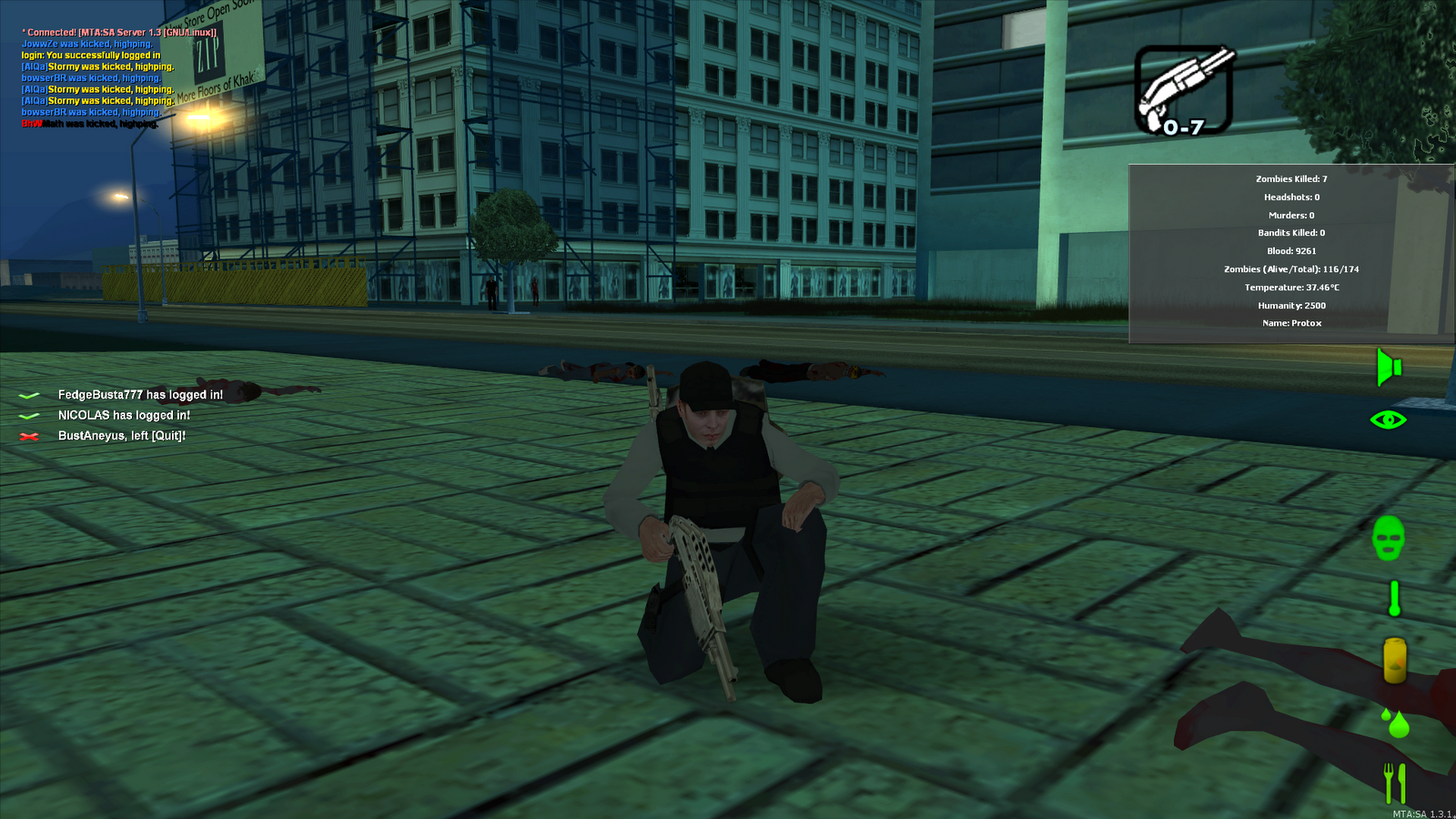
Typical spawn point close to water, you spawn with 2 bandages and 1 painkiller. I've edited this screenshot to provide a quick description of the interface. You need to run away from spawns quick, there maybe other players in the area looking to kill you. Your priority in the beginning is to find a weapon, water and food. You can find these items by the entrances of buildings, on dead players or zombies.
Attacking a zombie with a knife, takes about 3 hits to take one down. Don't waste your time fighting them off with your fists, run away and find a weapon first. Zombies aren't hard to kill but can overwhelm you in tight spots.
After killing 5 zombies. Crouching makes you less visible to zombies. If you kill a few players your skin will turn into a bandit. Be careful around any other players, some are friendly most will try to kill you.
It's very difficult to take combat screenshots as combat requires full use of the keyboard and mouse. So these basic early game screenshots don't do justice to the gameplay, but trust me it's good.
DayZ GTA How-To Guide:
Basic Controls:
Other:
Items with no use: (do not pick them up they just take backpack space)
In this game you can use a few other player model skins, first you need to find them and then to equip them just place them into your backpack, right click and select equip. Your skin will auto-change if you kill enough players and become a bandit. You will also want to drop your standard skin if you plan to use another one as it takes up backpack space. There are 4 regular skins and 2 bandit skins available.
You have primary and secondary weapons, all weapons except Knife and Katana require ammo. Two weapons can be equipped at the same time, use mouse scroll to change between equipped weapons and use inventory (J) + right click to equip weapons. You can carry as many weapons and ammo as your backpack allows.
Primary Weapons:
More info about weapon stats: http://wiki.dayz-mta.net/index.php/Weapons
Basic Strategy:
You need to find a weapon as soon as possible, a knife or a katana is a good start. It will allow you to kill zombies, it takes about 3 hits to take out a zombie. You can run in a straight line do a 180 degree turn and strike them with a knife, then continue running past them, repeat until they are dead. Some zombies have loot. You should also look around building entrances and dead players.
After that you need to find some water and food. Water will drain slightly quicker than food. It takes a while for you to become thirsty or hungry to the point of draining health, but it is also important to make sure your essentials are covered. You should also look for a bigger backpack, it will allow you to collect more items, ultimate goal for a backpack is the coyote backpack. A map is also very good to have, you will have a good idea where to go. Certain areas are dominated by different groups of people, there are a lot of places to explore.
After this point focus on getting some guns and ammo and continue exploring. You may want to try to find a vehicle or infiltrate an area once you have the basics. This game is probably better enjoyed with a group of friends, but it might be hard to get everyone together in one area.
Keep in mind you will probably die a lot, so be careful around other people. Crouch and hide if you see someone, if they start shooting take cover or run away unless you have superior firepower and a good strategy for attack.
I also made an image guide for DayZ GTA version:
If you want a larger version of the image guide or if it needs to be updated you can download the PSD version here.
Hope you found this article useful and will give this game a try, I play by the name Protox in case you run in to me.
What is required:
1. GTA: San Andreas 1.0
- If you have a steam version of GTA: San Andreas or a new retail release/upgrade you will need to downgrade to San Andreas 1.0
- You may also need a no cd gta_sa.exe version if you have issues starting the game (I had issues with the retail version of the game and needed a no cd executable to fix it) The HOODLUM release no cd hlm-gtasa will work. gta_sa.exe MD5: 170b3a9108687b26da2d8901c6948a18 (use Google to find it)
3. After installing SA 1.0 and MTA, start Multi Theft Auto and connect to 176.65.141.184:22003
4. You will download about 12mb worth of resources and an additional 3mb map file, if the download is slow just wait it may take a few minutes. Each time you rejoin the server you will have to re-download the 3mb map file, but not the resource file.
5. Once connected create a username/password and login, you will then spawn in the game. If you leave the server you character will be saved, just remember your login info. If you die your character will re-spawn and you will lose all your items, you can try to go back to the location of your death and attempt to pick up your old items if they haven't been looted yet.
Screenshots:
Typical spawn point close to water, you spawn with 2 bandages and 1 painkiller. I've edited this screenshot to provide a quick description of the interface. You need to run away from spawns quick, there maybe other players in the area looking to kill you. Your priority in the beginning is to find a weapon, water and food. You can find these items by the entrances of buildings, on dead players or zombies.
After killing 5 zombies. Crouching makes you less visible to zombies. If you kill a few players your skin will turn into a bandit. Be careful around any other players, some are friendly most will try to kill you.
It's very difficult to take combat screenshots as combat requires full use of the keyboard and mouse. So these basic early game screenshots don't do justice to the gameplay, but trust me it's good.
DayZ GTA How-To Guide:
Basic Controls:
- WASD to move around and the mouse to aim and look around
- MOUSE1 to shoot/attack
- MOUSE2 aim/zoom weapons
- MIDDLE MOUSE to look behind or to pick up items/inventory over gear
- SHIFT to jump or climb obstacles
- SPACE to run
- C to crouch (zombies are less likely to attack from certain distance when crouching)
- J to open your inventory, right click an item and select an action to use it (e.g. select pizza, right click and select to eat it)
- TAB for score board
- F1 for group system
- F5 to close or open right side stats (leave it open it's useful)
- F11 to use map, you need to find a map first
- T for local chat (limited by distance) also press T and type /msg PlayerName Your Message to pm players (not limited by distance)
- O for global chat
- Z for radio chat (requires radio device, limited by distance)
- F to enter vehicles, G to enter as a passenger (vehicles are rare and require engine, tires and fuel)
- I for Infrared Vision (requires infrared goggles)
- N for Night Vision (requires night vision goggles)
- Milk, Soda Bottle, Full Water Bottle
- Empty Water Bottle can be refilled in any lake/pool, go in to water until you are swimming and right click to refill
- Beans Can, Pasta Can: restores 200 blood
- Pizza, Burger: restores 300 blood
- Cooked Meat: restores 800 blood
- Bandage: stops bleeding
- Painkiller: stops screen shaking after taking a certain type of damage
- Morphine: used to fix broken bones
- Medkit: restores health (but not fully about 8000-9000 blood)
- Heat Pack: used to restore body temperature, rarely used since body temperature only drops after a very long time in water
- Blood Bag: restores full health (12000 blood), but requires another player to do a blood transfusion
- Default: 10 spaces
- Small Backpack: 16 spaces
- Alice Backpack: 28 spaces
- Coyote Backpack: 36 spaces
Other:
- Map: shows your location and a full map of the game when you press F11 (no bp space used)
- GPS: shows a small location map in left bottom corner of your screen (no bp space used)
- Watch: shows time in top right corner (no bp space used)
- Lighter: requires wood and animal flesh to make cooked meat (no bp space used)
- Wood: requires lighter and animal flesh to make cooked meat
- Road Flare: used to create a strong visible light
- Infrared Goggles: Infrared vision, press I to enable/disable
- Night Vision Goggles: Night vision, press N to enable/disable
- Tent: used to store items
- Wire Fences: used to block off areas
- Toolbox: used to destroy a wire fence and to repair vehicles (unlimited use)
- Empty/Full Patrol Canister: fuel required for vehicles, can be refilled at gas stations
- Tires: multiple required for vehicles
- Engine: required for vehicles
Items with no use: (do not pick them up they just take backpack space)
- Scrubby Burgers
- Empty Soda Cans
In this game you can use a few other player model skins, first you need to find them and then to equip them just place them into your backpack, right click and select equip. Your skin will auto-change if you kill enough players and become a bandit. You will also want to drop your standard skin if you plan to use another one as it takes up backpack space. There are 4 regular skins and 2 bandit skins available.
- Standard Skin: The default skin you spawn with, will change into a bandit skin if you kill players.
- Civilian Skin: Elderly veteran skin, will change into an arctic bandit skin if you kill players.
- Army Skin: Army soldier skin, some zombies use this skin as well.
- Sniper Skin: You will turn into a green Chewbacca.
You have primary and secondary weapons, all weapons except Knife and Katana require ammo. Two weapons can be equipped at the same time, use mouse scroll to change between equipped weapons and use inventory (J) + right click to equip weapons. You can carry as many weapons and ammo as your backpack allows.
Primary Weapons:
- Shotgun Ammo: Shotgun, Sawn-Off Shotgun, SPAZ-12 Combat Shotgun
- Assault Ammo: AK-47, M4
- Sniper Ammo: Country Rifle, Sniper Rifle
- Rocket Ammo: Rocket Launcher, Heat-Seeking RPG
- Melee: Knife, Katana
- Pistol Ammo: Pistol, Silenced Pistol, Desert Eagle
- SMG Ammo: UZI, TEC-9, MP5
More info about weapon stats: http://wiki.dayz-mta.net/index.php/Weapons
Basic Strategy:
You need to find a weapon as soon as possible, a knife or a katana is a good start. It will allow you to kill zombies, it takes about 3 hits to take out a zombie. You can run in a straight line do a 180 degree turn and strike them with a knife, then continue running past them, repeat until they are dead. Some zombies have loot. You should also look around building entrances and dead players.
After that you need to find some water and food. Water will drain slightly quicker than food. It takes a while for you to become thirsty or hungry to the point of draining health, but it is also important to make sure your essentials are covered. You should also look for a bigger backpack, it will allow you to collect more items, ultimate goal for a backpack is the coyote backpack. A map is also very good to have, you will have a good idea where to go. Certain areas are dominated by different groups of people, there are a lot of places to explore.
After this point focus on getting some guns and ammo and continue exploring. You may want to try to find a vehicle or infiltrate an area once you have the basics. This game is probably better enjoyed with a group of friends, but it might be hard to get everyone together in one area.
Keep in mind you will probably die a lot, so be careful around other people. Crouch and hide if you see someone, if they start shooting take cover or run away unless you have superior firepower and a good strategy for attack.
I also made an image guide for DayZ GTA version:
Hope you found this article useful and will give this game a try, I play by the name Protox in case you run in to me.
Saturday, August 18, 2012
Gift Certificate Templates
Haven't posted in a long time.
I've recently started a new website to create free gift certificates. The idea is pretty simple, someone is looking for a personal or business gift certificate template. They find my site and use the online tool to make a gift certificate for free. In exchange I have some basic ads, hopefully it would make it worthwhile for me overtime. The start up costs are minimal.
I'm currently offering general business gift certificates, birthday, Christmas, Halloween, Valentines, Easter, golf, coffee and a few others. Planning to expand into providing spa and massage gift certificates as it seems quite a few people are looking for them.
Here is a sample gift certificate template, as you can see you can fill in any of the blank fields with whatever information you want. The competition in gift certificate websites is tough, many sites offer them. But I find the quality of most is quite low, also many require you to modify the gift certificate in Microsoft Office (doc) or Adobe Acrobat (pdf).
The experience in creating a new type of website/service is quite interesting and I'm learning quickly. I've had plenty of HTML and CSS experience, making basic personal websites. Even the theme for this blog is custom made through some basic CSS editing. But I wasn't familiar with HTML5 in particular HTML5 canvas and jquery. So I've had to check plenty of web resources, and I'm surprised how powerful some of more modern tools are. For example my gift template website uses HTML5 canvas and a little jquery to fill in the information for the gift certificates, everything is done client side which makes it a very low resource site. I've would have never imagined a decade ago that such functionality was possible without a database and some heavy server side scripts for image editing. I'm not sure if I simply didn't look into it, or if it really was the case. Either way it's easier now to create a web service with some simple code, instead of a static website.
If my site has any type of success I'll write a follow up, maybe a general guide on what I did right or wrong. For now I'm trying to optimize it and provide the best service I can. Thanks for reading.
I've recently started a new website to create free gift certificates. The idea is pretty simple, someone is looking for a personal or business gift certificate template. They find my site and use the online tool to make a gift certificate for free. In exchange I have some basic ads, hopefully it would make it worthwhile for me overtime. The start up costs are minimal.
I'm currently offering general business gift certificates, birthday, Christmas, Halloween, Valentines, Easter, golf, coffee and a few others. Planning to expand into providing spa and massage gift certificates as it seems quite a few people are looking for them.
Here is a sample gift certificate template, as you can see you can fill in any of the blank fields with whatever information you want. The competition in gift certificate websites is tough, many sites offer them. But I find the quality of most is quite low, also many require you to modify the gift certificate in Microsoft Office (doc) or Adobe Acrobat (pdf).
The experience in creating a new type of website/service is quite interesting and I'm learning quickly. I've had plenty of HTML and CSS experience, making basic personal websites. Even the theme for this blog is custom made through some basic CSS editing. But I wasn't familiar with HTML5 in particular HTML5 canvas and jquery. So I've had to check plenty of web resources, and I'm surprised how powerful some of more modern tools are. For example my gift template website uses HTML5 canvas and a little jquery to fill in the information for the gift certificates, everything is done client side which makes it a very low resource site. I've would have never imagined a decade ago that such functionality was possible without a database and some heavy server side scripts for image editing. I'm not sure if I simply didn't look into it, or if it really was the case. Either way it's easier now to create a web service with some simple code, instead of a static website.
If my site has any type of success I'll write a follow up, maybe a general guide on what I did right or wrong. For now I'm trying to optimize it and provide the best service I can. Thanks for reading.
Sunday, April 3, 2011
Protox Simple
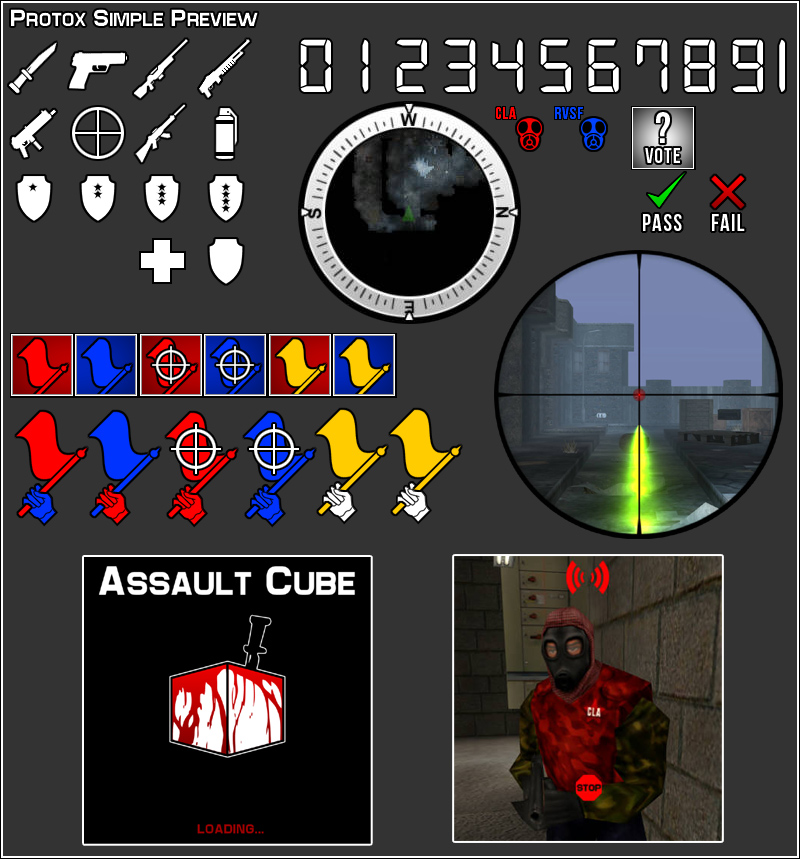
A simple graphics mod for Assault Cube 1.1 a free and opensource FPS game. This mod changes most graphics, icons and effects in Assault Cube 1.1.
You can download the mod at DeviantArt and Akimbo.in. Also posted a thread on the official AssaultCube forum.
Preview:

In Game Screenshot:
You can download the mod at DeviantArt and Akimbo.in. Also posted a thread on the official AssaultCube forum.
Preview:

In Game Screenshot:
Tuesday, March 29, 2011
Protox High Quality Reskin
Releasing my high quality reskins, this mod modifies all the default player skins for Assault Cube 1.1 with high quality reskins. The resolution of these skins is 2 times (from 320x200, to 640x400) the originals. These skins are released under public domain with no license or restrictions.
Download:
Download from DeviantArt
Download from Akimbo.in
Source Files (For Modifying/Generating New Skins):
Download from DeviantArt
Preview:

In-Game:
Download:
Download from DeviantArt
Download from Akimbo.in
Source Files (For Modifying/Generating New Skins):
Download from DeviantArt
Preview:

In-Game:
Tuesday, March 22, 2011
Protox Mod Update
I've updated Protox Mod (version 2.0.5) for the free and opensource FPS game Assault Cube. This mod modifies most visible icons and effects in Assault Cube 1.1.
You can download the mod at DeviantArt and Akimbo.in. I've also posted a thread about this mod on the official AssaultCube forum.
March 22, 2011 - Version 2.0.5:

In Game Screenshot:
You can download the mod at DeviantArt and Akimbo.in. I've also posted a thread about this mod on the official AssaultCube forum.
March 22, 2011 - Version 2.0.5:
- Modified protox_mod.bat to allow arguments when launched from cmd [Reported by Gibstick]
- New base.png (spark effect on bullet impact)
- New bullethole.png (bullet indent in walls)
- New explosion.png (more detailed grenade explosion, generated with Filter Forge using Explosion Filter)
- New muzzleflash.jpg (bigger and more detailed)
- New smoke.png (spark and smoke effect for sniper shot)
- Modified voteicons.png (added checkmark and x indications for votes, tweaked hand icon)
- Modified protox_mod_preview.jpg and renamed from preview.jpg
- Renamed readme.txt to protox_mod_readme.txt
- Removed screenshot.jpg to reduce filesize

In Game Screenshot:
Tuesday, February 15, 2011
Blogger Theme Change
I've modified the blogger theme, for the 2 or 3 people who occasionally frequent this blog maybe you will notice. I originally wanted to select one of the newer themes available for blogger, but this completely messed up the text and image layout I had going. The HTML mark up of posts appears to be depended on the blog width. So I manually modified the original theme and changed a bunch of things, but primary colors and fonts. Maybe one day I will attempt to fix each post, the blogger compose mode is to blame and the way it adds images.
I also added a Links section, and will eventually add websites/resources that are related or that I frequent. I highly recommend checking out K.Mandla’s blog if you haven't already. K.Mandla is a minimalist when it comes to software and operating systems. I've been visiting the blog for a while and he updates it frequently with very informative articles about his experiences running light software and system configurations on older hardware. I agree with his philosophies about software becoming way too bloated to accomplish the same tasks, but I am not as dedicated or experienced in managing such minimal system configurations.
Sunday, February 13, 2011
Theme Mockups
Configure Grub2 Background Image, Resolution and Colors
Here is a method that worked for me to configure Grub2 under Debian 6.0 Squeeze.
First as root or sudo edit /etc/grub.d/05_debian_theme
Add the following somewhere near the top of the file:
menu_color_ changes the colors within the grub selection menu, while color_ changes outside the barrier. If you set black as the second color in any of the entries, for example: menu_color_normal=light-cyan/black grub will make it transparent. You can check here to see a list of available colors.
At the very bottom of 05_debian_theme add the following:
set_background_image "/path/to/your/boot/image.png" ||
set_custom_theme
Remember to select an image that is the same size as you will define in your grub boot screen resolution in the next step, save the file after you are done.
Now as root or sudo edit /etc/default/grub
You might want to modify GRUB_DEFAULT=0, this is the default boot selection, if you want another entry to boot first change it here. GRUB_TIMEOUT=5 is the default timeout before boot of the selected entry in seconds.
GRUB_GFXMODE=1024x768 sets the resolution of grub2 (I think if you add an x after resolution and a mode [e.g. 1024x768x24] you can define the color depth mode, I could be wrong), make sure the background image you set previously is the same size. Also you might want to edit GRUB_GFXPAYLOAD_LINUX=keep and also make sure it is set as =keep. This option will retain your selected resolution during the boot process.
Finally for all your changes to work, as root or sudo you must do update-grub. This will generate a /boot/grub/grub.cfg using your settings.
I honestly hate grub2, it works well for booting operating systems, but it is really disorganized, you can do things a number of ways and it doesn't always work. There is no consistency or easy way to modify everything through a single file, like in the original grub. This method worked for me but took me a while to figure out. If you set your colors under set_default_theme() in /etc/grub.d/05_debian_theme or in /etc/default/grub like a lot of people tell you to, you will discover in (At least under Debian 6.0) your /boot/grub/grub.cfg they get ignored when you have selected a background and revert to a default grey color scheme. This is why I create a custom set_custom_theme() function.
Here is my /etc/grub.d/05_debian_theme and /etc/default/grub, for reference purposes.
First as root or sudo edit /etc/grub.d/05_debian_theme
Add the following somewhere near the top of the file:
set_custom_theme(){
# Set custom color theme.
echo "${1}set menu_color_normal=light-cyan/black"
echo "${1}set menu_color_highlight=white/light-blue"
echo "${1}set color_normal=white/black"
echo "${1}set color_highlight=white/light-blue"
}
menu_color_ changes the colors within the grub selection menu, while color_ changes outside the barrier. If you set black as the second color in any of the entries, for example: menu_color_normal=light-cyan/black grub will make it transparent. You can check here to see a list of available colors.
At the very bottom of 05_debian_theme add the following:
set_background_image "/path/to/your/boot/image.png" ||
set_custom_theme
Remember to select an image that is the same size as you will define in your grub boot screen resolution in the next step, save the file after you are done.
Now as root or sudo edit /etc/default/grub
You might want to modify GRUB_DEFAULT=0, this is the default boot selection, if you want another entry to boot first change it here. GRUB_TIMEOUT=5 is the default timeout before boot of the selected entry in seconds.
GRUB_GFXMODE=1024x768 sets the resolution of grub2 (I think if you add an x after resolution and a mode [e.g. 1024x768x24] you can define the color depth mode, I could be wrong), make sure the background image you set previously is the same size. Also you might want to edit GRUB_GFXPAYLOAD_LINUX=keep and also make sure it is set as =keep. This option will retain your selected resolution during the boot process.
Finally for all your changes to work, as root or sudo you must do update-grub. This will generate a /boot/grub/grub.cfg using your settings.
I honestly hate grub2, it works well for booting operating systems, but it is really disorganized, you can do things a number of ways and it doesn't always work. There is no consistency or easy way to modify everything through a single file, like in the original grub. This method worked for me but took me a while to figure out. If you set your colors under set_default_theme() in /etc/grub.d/05_debian_theme or in /etc/default/grub like a lot of people tell you to, you will discover in (At least under Debian 6.0) your /boot/grub/grub.cfg they get ignored when you have selected a background and revert to a default grey color scheme. This is why I create a custom set_custom_theme() function.
Here is my /etc/grub.d/05_debian_theme and /etc/default/grub, for reference purposes.
AssaultCube, Quake2 and AQ2 Mods/Paks
Here is a re-release of pak files and mods I made for AssaultCube, Quake2 and Action Quake2 mod. These custom modifications change the overall appearance of the in-game hud graphics and other images for each game.
(for AssaultCube) Protox Mod: download here


(for Quake2) PrimoTurbo's Quake2 Pak: download here

(for Action Quake2) PrimoTurbo's Pro Pak: download here
(for AssaultCube) Protox Mod: download here


(for Quake2) PrimoTurbo's Quake2 Pak: download here

(for Action Quake2) PrimoTurbo's Pro Pak: download here
Generate Xorg.conf, Remove Screen Blackout and Force Resolutions
New versions of most GNU/Linux distributions do not include an xorg.conf file which defines all your hardware and especially your video driver and screen resolutions/refresh rate. I find that I still need an xorg.conf file to disable screen blacking out after a set period of time and to force resolutions and screen refresh rate. I hate that gdm by default starts at max resolution, if you define resolutions it will force gdm to use the highest one you define instead. Most people don't care about this because they are running on LCD monitors, but I still prefer a CRT on my main computer.
Generate a proper Xorg.conf in Debian 6.0 Squeeze (probablly works for most GNU/Linux distributions)
Log out and switch to console mode(Ctrl+Alt+F1) as root or sudo do:
/etc/init.d/gdm3 stop
Xorg -configure #generate a new xorg.conf file
X -config /root/xorg.conf.new #test that it works
mv /root/xorg.conf.new /etc/X11/xorg.conf #move xorg.conf
nano /etc/X11/xorg.conf #edit with nano or editor of your choice
once your done editing do CTRL+O to save and CTRL+X to quit nano. You can now restart.
Or try /etc/init.d/gdm3 start and then startx
To remove/modify screen blank/black out:
Edit your xorg.conf as root/sudo
Between Section "ServerLayout" & EndSection add:
To define custom resolutions/refresh rate:
In xorg.conf:
Edit between Section "Screen" SubSection "Display" and EndSubSection EndSection
Mine looks like this:
Generate a proper Xorg.conf in Debian 6.0 Squeeze (probablly works for most GNU/Linux distributions)
Log out and switch to console mode(Ctrl+Alt+F1) as root or sudo do:
/etc/init.d/gdm3 stop
Xorg -configure #generate a new xorg.conf file
X -config /root/xorg.conf.new #test that it works
mv /root/xorg.conf.new /etc/X11/xorg.conf #move xorg.conf
nano /etc/X11/xorg.conf #edit with nano or editor of your choice
once your done editing do CTRL+O to save and CTRL+X to quit nano. You can now restart.
Or try /etc/init.d/gdm3 start and then startx
To remove/modify screen blank/black out:
Edit your xorg.conf as root/sudo
Between Section "ServerLayout" & EndSection add:
Option "BlankTime" "0"Also make sure you have Option "DPMS" between Section "Monitor" & End Section.
Option "StandbyTime" "0"
Option "SuspendTime" "0"
Option "OffTime" "0"
To define custom resolutions/refresh rate:
In xorg.conf:
Edit between Section "Screen" SubSection "Display" and EndSubSection EndSection
Mine looks like this:
Section "Screen"I am not sure why but I find that Depth 24 limits my refresh rate to 85Hz, which is what I prefer. If I try Depth 32 it makes my max resolution 1600x1200 even when I define 1280x1024 as max. I can't explain it but for some reason this odd behavior occurs, so 24 is what I use and I remove all other depths to prevent lower refresh rates. Here is my full xorg.conf as reference/guideline. I hope this can help someone.
Identifier "Screen0"
Device "Card0"
Monitor "Monitor0"
SubSection "Display"
Viewport 0 0
Depth 24
Modes "1280x1024" "1024x768" "800x600" "640x480"
EndSubSection
EndSection
Changing GDM3 Theme and Wallpaper
Here is a quick hack for GDM3 to change the GTK controls and wallpaper/background image. This won't change the overall design/layout.
edit /etc/gdm3/greeter.gconf-defaults with a text editor as root or sudo.
Uncomment and edit the following lines by removing the # character.
Then as root/sudo run dpkg-reconfigure gdm3
edit /etc/gdm3/greeter.gconf-defaults with a text editor as root or sudo.
Uncomment and edit the following lines by removing the # character.
/desktop/gnome/background/picture_filename /path/wallpaper.png
/desktop/gnome/interface/gtk_theme AuroraSet the path to your background image on the picture_filename line. Set the GTK theme you want to use at the gtk_theme line. Make sure it is something valid that you have installed like Clearlooks or in my case Aurora. Also it's best to keep the background image the same size as your gdm3 resolution.
Then as root/sudo run dpkg-reconfigure gdm3
Fix Slow Warcraft3 Performance in Wine

Warcrat3 is one of my favorite games, I especially like to play custom maps like Legion TD, Battleships, Island Defense, Burbenog TD, Gem TD, Zoator TD, Jurassic Park Survival, Green Circle TD, Dota and tons of others. It's amazing that a small custom map file can completely change the game into something else. People have become incredibly creative in making custom games for Warcraft and there is still a huge player base despite the age of the game (RoC released in 2002 and TFT Expansion in 2003). Without some tweaks Warcraft3 runs very sluggish, poorly, slow and laggy under wine. The good news is there is an easy solution.
First install wine, then run through the normal install of Warcraft3 RoC & TFT using wine. After you are done you will need to patch the game, at the moment the latest patch is version 1.24e which you can download here (for either Reign of Chaos or Frozen Throne). It also appears that the newer patches automatically include a nocd which allow you to play the game without having the game cd in the drive, run the patch through wine and let it install.
Fix game crash/freeze at start:
I have found that if you don't remove/rename the included movies, especially the intro movies the game will not properly start as wine is unable to play them. If you go into /home/yourusername/.wine/drive_c/Program Files/Warcraft III/Movies, you can delete them to make the game start/work.
Getting rid of slow performance:
Open a terminal and run wine regedit. Go into HKEY_CURRENT_USER/Software/Blizzard Entertainment/Warcraft III/, right click and create a new DWORD Value with the name Gfx OpenGL, double click it and set the Value data: to 1 as a Base of Hexadecimal. Type: should show REG_DWORD and Data: should be 0x00000001 (1) in regedit. If you go into HKEY_CURRENT_USER/Software/Blizzard Entertainment/Warcraft III/Video you can also set your game refresh rate by modifying the refreshrate DWORD key, also change the cinematicrefresh DWORD key to the same value. The Base for both should be in Decimal. Also if you want you might want to add -opengl to your Warcraft3 launch shortcut, something like env WINEPREFIX="/home/yourusername/.wine" wine "C:\Program Files\Warcraft III\Frozen Throne.exe" -opengl, but I have found that this is not nessesary once you create a Gfx OpenGL DWORD.
Setting proper resolution:
Start winecfg, under Applications tab add application and add Frozen Throne.exe and Warcraft III.exe (if you play the default RoC game). Now make sure the exe is selected and switch to Graphics tab. At this point I select Allow DirectX apps to stop mouse leaving their window & Emulate a virtual desktop. You want your virtual desktop to be the same size as your default resolution, mine is set at 1280x1024. You also want your Warcraft3 game to be the same resolution or otherwise this will create empty space. If you do this correctly you will be able to alt-tab very quickly without switching resolutions. Useful for checking youtube while you wait for a custom game to fill.
Let me know if this worked for anyone else, also you can reduce in-game quality through the game's options, I keep my settings on medium to high and it runs great with this tweak. Furthermore make sure you have an adequate driver installed for your video card.
February Debian Squeeze
Here is my current desktop, running Debian 6.0 Squeeze.

GTK: Aurora
Metacity: Clear-Elementary
Icons: Faenza
Not sure of the source/name of wallpaper.

GTK: Aurora
Metacity: Clear-Elementary
Icons: Faenza
Not sure of the source/name of wallpaper.
Debian Space Wallpapers
EDIT: I've changed the 2560x1600 resolutions to point to my deviantART page, appears that blogger resizes very large images.
I recently made some space based wallpapers for Debian.
Debian Planet
2560x1600

1600x1200

Debian Vortex
2560x1600

1600x1200

I've also posted them on the Debian User Forums, here and here.
I might make more Debian space related wallpapers and re-release everything with a bunch of different sizes, but for now just use an image program like GIMP to resize/recut the wallpapers for your screensize or center/scale them. The new official Space Fun theme for Debian 6.0 Squeeze is not to my taste, looks very childish to be honest. To each their own I guess, but I do wish they chose something different like Debian Ciel.
I recently made some space based wallpapers for Debian.
Debian Planet
2560x1600

1600x1200

Debian Vortex
2560x1600

1600x1200

I've also posted them on the Debian User Forums, here and here.
I might make more Debian space related wallpapers and re-release everything with a bunch of different sizes, but for now just use an image program like GIMP to resize/recut the wallpapers for your screensize or center/scale them. The new official Space Fun theme for Debian 6.0 Squeeze is not to my taste, looks very childish to be honest. To each their own I guess, but I do wish they chose something different like Debian Ciel.
Subscribe to:
Posts (Atom)